Pydantic Logfire
Find the data behind production ValidationErrors. Logfire records failed Pydantic validations with
their structured errors and can keep them inside the surrounding request or job trace, so you can see
what failed, where the input came from, and whether the same problem keeps happening.
Record failed validations
You need a free Logfire account and project. From your project directory, install the SDK and sign in:
pip install logfire
logfire auth
Call instrument_pydantic() before defining or importing the models you want to monitor:
from datetime import date

import logfire

from pydantic import BaseModel

logfire.configure()
logfire.instrument_pydantic(record='failure')  # (1)!


class User(BaseModel):
    name: str
    country_code: str
    dob: date


User(name='Anne', country_code='USA', dob='not-a-date')  # (2)!
- Successful validations stay as aggregate metrics. Failed validations create individual warning records with their structured errors.
- Run the example and choose or create a Logfire project when prompted. The invalid date produces a warning record in Logfire's Live view.
Review validation data before exporting it
Failed-validation records contain the rejected values from Pydantic's structured errors. Logfire
scrubs common sensitive values before
export, but Logfire stores every rejected value under the key input inside the serialized
errors attribute, separately from its field path. If those values can contain secrets or personal
data, pass scrubbing=logfire.ScrubbingOptions(extra_patterns=[r'(?:^input$|"input"\s*:)']) to
logfire.configure(). The two alternatives tell the scrubber to inspect serialized validation
errors and redact every value whose exact key is input; neither refers to your model's field
names. Alternatively, use record='metrics' so individual failures are not exported.
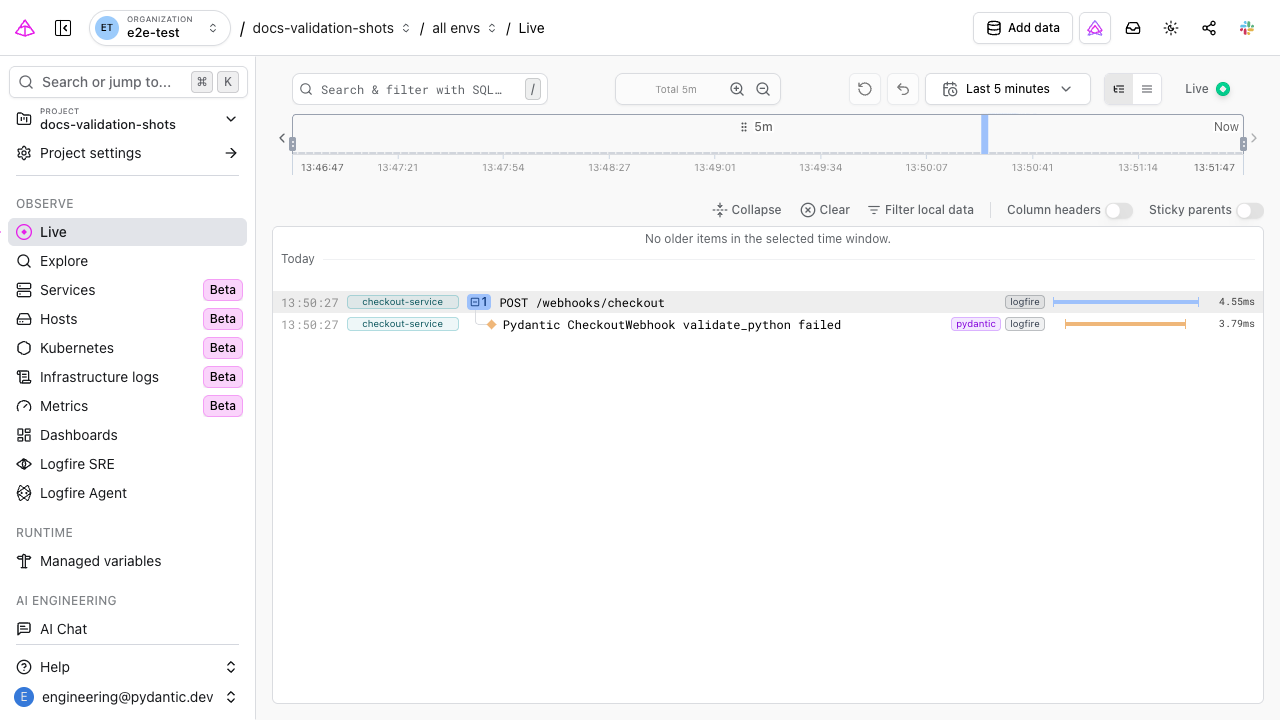
Open the warning to inspect the rejected values, error type and field path, and any request or job trace active when validation ran. For a deeper walkthrough, see Troubleshooting Validation Errors.
Choose how much to record
The record argument controls the balance between detail and data volume:
| Setting | Individual records | Metrics |
|---|---|---|
failure |
Failed validations only | All validations |
all (default) |
Every successful and failed validation | All validations |
metrics |
None | All validations |
off |
None | None |
Use failure for production troubleshooting without creating an individual record for every
successful validation. Use all while developing when you want to inspect successful inputs and
validated results too.
import logfire

logfire.instrument_pydantic(record='all')
For per-model settings, third-party model inclusion, and configuration through environment variables
or pyproject.toml, see the full
Logfire Pydantic integration reference.
Add the surrounding application trace
Pydantic tells you which value failed. Instrument your web framework, database client, or task queue to see where that value came from and what happened around it. For example, a FastAPI trace can show the request that reached your endpoint, the failed model validation, and the response returned to the caller in one timeline.
See Logfire integrations for FastAPI, Django, Celery, SQLAlchemy, HTTPX, and more.
Log a validated model explicitly
You can also attach a Pydantic model to your own structured log or span. Logfire preserves the model's fields so you can inspect and query them:
from datetime import date

import logfire

from pydantic import BaseModel

logfire.configure()


class User(BaseModel):
    name: str
    country_code: str
    dob: date


user = User(name='Anne', country_code='USA', dob='2000-01-01')
logfire.info('user processed: {user!r}', user=user)
Troubleshooting
- No validation records appear: make sure
logfire.configure()runs and thatinstrument_pydantic()runs before the model class is defined or imported. - Successful validations do not appear:
record='failure'keeps them as metrics only. Userecord='all'when you need an individual span for each success. - You need to inspect successful validations too: use
record='all'. This creates an individual span for every validation, so review its data-volume and privacy implications before using it in production.